


Type Safety
Void infers types from your database schema, route handlers, and page loaders. When you change a field, TypeScript shows which queries, requests, and components need to change.
The Type Pipeline
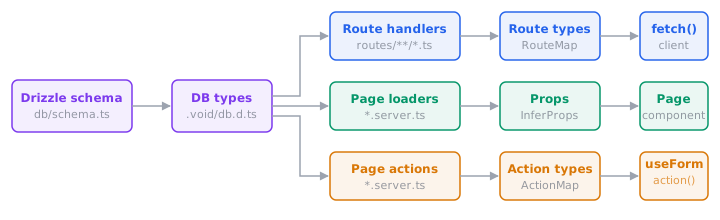
- Database types come from your Drizzle schema. Column types are known at compile time.
- Route handlers: return types and validator schemas become the generated
RouteMap, which the typed fetch client consumes. - Page loaders: return types flow into page components as props via
InferProps. - Page actions: validator schemas flow into
useFormandaction()for typed data, errors, and URL autocomplete.
All generated types live in .void/ and update automatically when source files or schema change.
Database → Handler → Client
Types flow from your Drizzle schema through handlers to the client without any manual annotations:
// routes/api/users.ts
export const GET = defineHandler(async (c) => {
  return db.select({ name: users.name, email: users.email }).from(users);
  //     ↑ return type inferred from schema columns
});

export const POST = defineHandler.withValidator({
  body: insertUserSchema, // ← derived from Drizzle schema
})(async (c, { body }) => {
  return db.insert(users).values(body).returning();
});// Client: types inferred from handlers above
const users = await fetch('/api/users');
// ↑ { name: string; email: string }[]
await fetch('/api/users', {
method: 'POST',
body: { name: 'Alice', email: 'alice@example.com' }, // ← typed from validator
});The Drizzle schema defines database columns, runtime validation, handler input types, and client-side type checking all at once. For endpoints that don't map to a table, use any Standard Schema library.
Loader → Page Props
In pages mode, a loader's return type flows into the page component via InferProps:
// pages/users/index.server.ts
export type Props = InferProps<typeof loader>;

export const loader = defineHandler(async (c) => {
  return { users: await db.select().from(users) };
});// pages/users/index.tsx
import type { Props } from './index.server';
export default function UsersPage({ users }: Props) {
// users: { id: number; name: string; ... }[]
}<!-- pages/users/index.vue -->
<script setup lang="ts">
import type { Props } from './index.server';
const { users } = defineProps<Props>(); // users: { id: number; name: string; ... }[]
</script><!-- pages/users/index.svelte -->
<script lang="ts">
import type { Props } from './index.server';
let { users }: Props = $props(); // users: { id: number; name: string; ... }[]
</script>// pages/users/index.tsx
import type { Props } from './index.server';
export default function UsersPage(props: Props) {
// props.users: { id: number; name: string; ... }[]
}No manual interface is needed. Props stay in sync with whatever the loader returns.
Action → useForm
When a page action uses withValidator(), the body schema flows through to useForm. That gives you typed data, typed errors keys, and URL autocomplete:
// pages/users/create.server.ts
export const action = defineHandler.withValidator({
  body: insertUserSchema,
})(async (c, { body }) => {
  await db.insert(users).values(body);
});const form = useForm('/users/create', { name: '', email: '' });
// ^ autocompletes ^ must match body schema
form.errors.email; // ✓ string | undefined
form.errors.foo; // ✗ TypeScript errorNamed actions work the same way. The ?actionName suffix selects the right types for that action:
const updateForm = useForm('/users/[id]?update', { name: '' }, { params: { id } });
const deleteForm = useForm('/users/[id]?delete', { id: '' }, { params: { id } });
// Each form's data and errors are typed from their respective validators
The action() helper gets the same type checking. See Actions & Forms for the full API.
Typed URLs and Navigation
To link to a user's profile, pass its route pattern and ID to routeUrl():
import { routeUrl } from 'void/routes';

const url = routeUrl('/users/[id]', {
  params: { id: 42 },
  query: { tab: 'activity' },
  hash: 'details',
});
// /users/42?tab=activity#details
TypeScript checks the route and required parameter names. Patterns follow your filenames: pages/users/[id].tsx, .vue, or .svelte uses /users/[id].
Parameters accept strings or numbers and are URL-encoded for you. Query values can be strings, numbers, booleans, or arrays. Arrays become repeated keys; null and undefined values are omitted.
The same bracket patterns work with typed fetch(), WebSocket connect(), page actions, and useParams().
Pass the returned string to Link, a plain <a>, or c.redirect(). For programmatic navigation and c.rewrite(), you can pass a destination object directly:
import type { RouteDestination } from 'void/routes';

const profile = {
  pathname: '/users/[id]',
  params: { id: 42 },
  query: { tab: 'activity' },
  hash: 'details',
} satisfies RouteDestination;
Destination objects check and encode parameters just like routeUrl(). See Pages Routing for client navigation and Rewrites for server navigation.
For a catch-all page such as pages/files/[...path].tsx, .vue, or .svelte, use /files/[...path] and pass the full path as one value:
routeUrl('/files/[...path]', { params: { path: 'docs/get started' } });
// /files/docs/get%20started
For an unnamed catch-all ([...]), pass its value under the '*' key:
routeUrl('/files/[...]', { params: { '*': 'docs/get started' } });
// /files/docs/get%20started
Page params
Pass the current page's pattern to useParams() to get typed parameters:
import { useParams } from '@void/react';

const { id } = useParams<'/users/[id]'>(); // id: string
useParams<'/users/[id]'>().idd; // Type error: no such param
useParams<'/userz/[id]'>(); // Type error: no page matches<script setup lang="ts">
import { useParams } from '@void/vue';
const params = useParams<'/users/[id]'>();
params.id; // string
params.idd; // Type error: no such param
useParams<'/userz/[id]'>(); // Type error: no page matches
</script><script lang="ts">
import { useParams } from '@void/svelte';
const params = useParams<'/users/[id]'>();
params.id; // string
params.idd; // Type error: no such param
useParams<'/userz/[id]'>(); // Type error: no page matches
</script>import { useParams } from '@void/solid';
const params = useParams<'/users/[id]'>();
params.id; // string
params.idd; // Type error: no such param
useParams<'/userz/[id]'>(); // Type error: no page matchesUse a page pattern, rather than an HTTP or WebSocket route. Named catch-alls such as /files/[...path] return { path: string }; unnamed catch-alls have no named params.
The type argument doesn't change which page is read. Without it, useParams() returns Record<string, string>.
On the server, c.req.param('slug') accepts any name. Read the params object through PageParams so a missing or misspelled name is a type error:
import type { PageParams } from 'void/routes';

const { slug } = c.req.param() as PageParams<'/posts/[slug]'>;
Prerender paths
Annotate getPrerenderPaths() with PageParams to check that every path includes the page's required parameters:
// pages/blog/[slug].server.ts
import type { PageParams } from 'void/routes';

export async function getPrerenderPaths(): Promise<PageParams<'/blog/[slug]'>[]> {
  return [{ slug: 'hello-world' }];
}
Void doesn't infer this return type from the filename; include the annotation to catch missing or misspelled keys. Custom SSR returns full paths instead, typed as Promise<string[]>. See Edge Prerendering and Static Site Generation.
For routing.prerender, use satisfies RouteUrl[] to check paths when routing.typedRoutes is enabled:
// void.config.ts
import { defineConfig } from 'void/config';
import type { RouteUrl } from 'void/routes';

export default defineConfig({
  routing: { prerender: ['/', '/blog/hello-world'] satisfies RouteUrl[] },
});
Checked URL strings
Enable routing.typedRoutes to catch misspelled URLs in links, router calls, redirects, rewrites, cache revalidation, island forms, and stream clients. Apps created with void init already have it enabled. For an existing app:
// void.config.ts
import { defineConfig } from 'void/config';

export default defineConfig({
  routing: { typedRoutes: true },
});
A string must then match one of your routes, optionally followed by a query string or hash:
import { Link } from '@void/react';
import { routeUrl } from 'void/routes';

<Link href="/about">About</Link>
<Link href={`/users/${user.id}?tab=activity`}>Profile</Link>
<Link href={routeUrl('/users/[id]', { params: { id } })}>Profile</Link>
<Link href="/abuot">About</Link> // Type error: no route matches<script setup lang="ts">
import { Link } from '@void/vue';
import { routeUrl } from 'void/routes';
</script>
<template>
<Link href="/about">About</Link>
<Link :href="`/users/${user.id}?tab=activity`">Profile</Link>
<Link :href="routeUrl('/users/[id]', { params: { id } })">Profile</Link>
<!-- Type error: no route matches -->
<Link href="/abuot">About</Link>
</template><script lang="ts">
import { Link } from '@void/svelte';
import { routeUrl } from 'void/routes';
</script>
<Link href="/about">About</Link>
<Link href={`/users/${user.id}?tab=activity`}>Profile</Link>
<Link href={routeUrl('/users/[id]', { params: { id } })}>Profile</Link>
<!-- Type error: no route matches -->
<Link href="/abuot">About</Link>import { Link } from '@void/solid';
import { routeUrl } from 'void/routes';
<Link href="/about">About</Link>
<Link href={`/users/${user.id}?tab=activity`}>Profile</Link>
<Link href={routeUrl('/users/[id]', { params: { id } })}>Profile</Link>
<Link href="/abuot">About</Link> // Type error: no route matchesLinks also accept same-page queries and hashes (?page=2, #comments), and http://, https://, mailto:, and tel: URLs. Use absolute paths within your app; relative paths such as ../settings are rejected. Static path segments accept raw text such as /café menu or uppercase percent encoding such as /caf%C3%A9%20menu.
String checks use TypeScript patterns, which don't validate individual dynamic segments. For example, /users/[id] also accepts /users/ and /users/42/edit. A root dynamic page can accept //example.com. Prefer routeUrl() to encode parameters, and validate untrusted URLs at runtime.
The SSE and live stream clients accept route URLs and external http:// or https:// URLs. Same-page links, mailto:, tel:, and ws:// aren't stream destinations.
c.redirect() accepts the same strings as links, plus a URL or destination object. For a URL from a provider SDK, your CMS, or public/, use as Href to skip the type check:
import { routeUrl, type Href } from 'void/routes';

declare const id: string;
declare const dynamic: string;

c.redirect('/about');
c.redirect(routeUrl('/users/[id]', { params: { id } }));
c.redirect({ pathname: '/users/[id]', params: { id } });
c.redirect('https://example.com/login');
c.redirect(new URL('https://example.com/login'));
c.redirect(dynamic as Href);
Cast only URLs you trust. Validate request values such as ?redirectTo= before redirecting; see c.redirect() for an example.
void/routes exports two types for these strings:
RouteUrl: the URL of one of your routes.routeUrl()returns it, andc.rewrite(),useIslandForm(), andrevalidate({ paths })accept it. Annotate arouting.prerenderlist with it.Href: anything a link orc.redirect()can point to: aRouteUrl, a same-page query or hash, or an external URL.
Use these types for URLs you check at runtime:
import { Link } from '@void/react';
import type { Href, RouteUrl } from 'void/routes';

<Link href={post.path as RouteUrl}>{post.title}</Link>
<Link href={user.website as Href}>Website</Link><script setup lang="ts">
import { Link } from '@void/vue';
import type { Href, RouteUrl } from 'void/routes';
const postHref = post.path as RouteUrl;
const website = user.website as Href;
</script>
<template>
<Link :href="postHref">{{ post.title }}</Link>
<Link :href="website">Website</Link>
</template><script lang="ts">
import { Link } from '@void/svelte';
import type { Href, RouteUrl } from 'void/routes';
const postHref = post.path as RouteUrl;
const website = user.website as Href;
</script>
<Link href={postHref}>{post.title}</Link>
<Link href={website}>Website</Link>import { Link } from '@void/solid';
import type { Href, RouteUrl } from 'void/routes';
<Link href={post.path as RouteUrl}>{post.title}</Link>
<Link href={user.website as Href}>Website</Link>The dev server keeps route types up to date. After changing routing.typedRoutes, restart it or run void prepare. For CI and standalone typechecking, follow Setup. See the API reference for the URL helper and route types.
What Gets Checked
| Layer | What's type-checked |
|---|---|
| Database | Table columns, value types, insert/update shapes from Drizzle schema |
| Handlers | c.env bindings, validator input, return type |
| Fetch client | Route paths, HTTP methods, body/query/params, response type |
| Navigation | Route patterns and required parameter names and values in routeUrl() and destination objects |
| Links | With routing.typedRoutes, URL strings in Link, router methods, c.rewrite(), useIslandForm(), and SSE and live stream clients |
c.redirect | With routing.typedRoutes, route URLs, same-page queries and hashes, destination objects, URL values, and http://, https://, mailto:, and tel: literals. A string TypeScript cannot check needs as Href. |
useParams | Page patterns and the names of the params they return |
c.req.param | Page param names, when the result is annotated with PageParams |
getPrerenderPaths | Page param names, when the return type is annotated with PageParams |
revalidate | With routing.typedRoutes, URL strings in paths |
routing.prerender | Paths, when the array is annotated with satisfies RouteUrl[] |
useForm | Action URLs, data fields, errors keys, reset() args (including { initial: true }), params, resetOnSuccess |
action() | Action URLs, data payload, params |
Serialization
The client types reflect JSON serialization through Serialize<T>:
| Source type | Serialized type |
|---|---|
string, number, boolean | unchanged |
Date | string |
Response | excluded (passed through at runtime) |
bigint, Function, undefined | excluded |
Array<T> / { key: T } | recursively serialized (function-valued keys stripped) |
Context Variables
Middleware and handlers share typed data through Hono's context variables. Augment CloudContextVariables to define your own:
// middleware/01.auth.ts
declare module 'void' {
  interface CloudContextVariables {
    requestId: string;
  }
}

export default defineMiddleware(async (c, next) => {
  c.set('requestId', crypto.randomUUID());
  await next();
});
Now c.get("requestId") returns string everywhere, with no assertion needed. Multiple augmentations across files are merged together.
Custom Binding Types
For native Cloudflare deployments, declare a binding in void.config.ts to give c.env its type. For example, add a rate limiter:
// void.config.ts
import { defineConfig } from 'void/config';

export default defineConfig({
  cloudflare: {
    ratelimits: [
      { name: 'MY_RATE_LIMITER', namespace_id: '1001', simple: { limit: 10, period: 60 } },
    ],
  },
});
Run void prepare, or start the dev server, to use the binding without a type assertion:
import { defineHandler } from 'void';

export const GET = defineHandler(async (c) => {
  const { success } = await c.env.MY_RATE_LIMITER.limit({ key: 'example' });
  return { success };
});
Service bindings use Fetcher, Durable Objects use DurableObjectNamespace, and other bindings use their standard Cloudflare types. For RPC methods or other specialized types, augment CloudBindings in a file included by your tsconfig:
import type {} from 'void';

declare module 'void' {
  interface CloudBindings {
    AUTH: Fetcher & { check(): Promise<boolean> };
  }
}
Augmentation can refine a generated binding or add one you provide separately. Values declared in env.ts keep their schema types. These types apply to Void's c.env; for cloudflare:workers, use your framework's binding types.
Setup
Extend the generated tsconfig in your project:
{
  "extends": "./.void/tsconfig.json",
  "compilerOptions": {
    "target": "ES2022",
    "module": "ES2022",
    "moduleResolution": "bundler",
    "strict": true,
    "jsx": "react-jsx",
    "types": ["void/env"]
  },
  "include": ["src", "routes", "middleware", "crons", "queues"]
}
If you already have a TypeScript config, run void init --tsconfig to add Void types while preserving your settings.
Run void prepare in CI or after a fresh clone, or let vite dev / vite build generate the .void/ files during normal app workflows.